
Many times when working on open-source codebases, I encounter a piece of code that I’d like to learn more context about or simply want to know who wrote it or when it was written. In most modern IDEs, there’s some sort of “git blame” functionality to show the history of any line of code, either built-in natively or through extensions like VSCode’s GitLens. In this short post, let’s explore how we can achieve the same in Emacs.
Emacs built-in: the VC way
Emacs’ native version control interface, VC, provides the command vc-annotate. When invoked on a version controlled buffer, VC opens a new split window and shows for each line when it was last edited and by whom. This git blame info appears on the left side of the code content, similar to how modern editors expand the left fringe to display the git history. Each line is highlighted in different colors depending on how recently it was last changed. If you’ve ever used Intellij IDEA’s VCS annotation function, it’s clear where the powerful Java IDE got its inspiration from (possibly down to the default highlight color choice). Within VC’s annotated buffer, hitting the letter l (or capital L if you’re using Evil-mode) on any line runs the command vc-annotate-show-log-revision-at-line, which opens a small split window that shows the full commit hash, author name, email, exact timestamp of the change along with the complete git commit message.
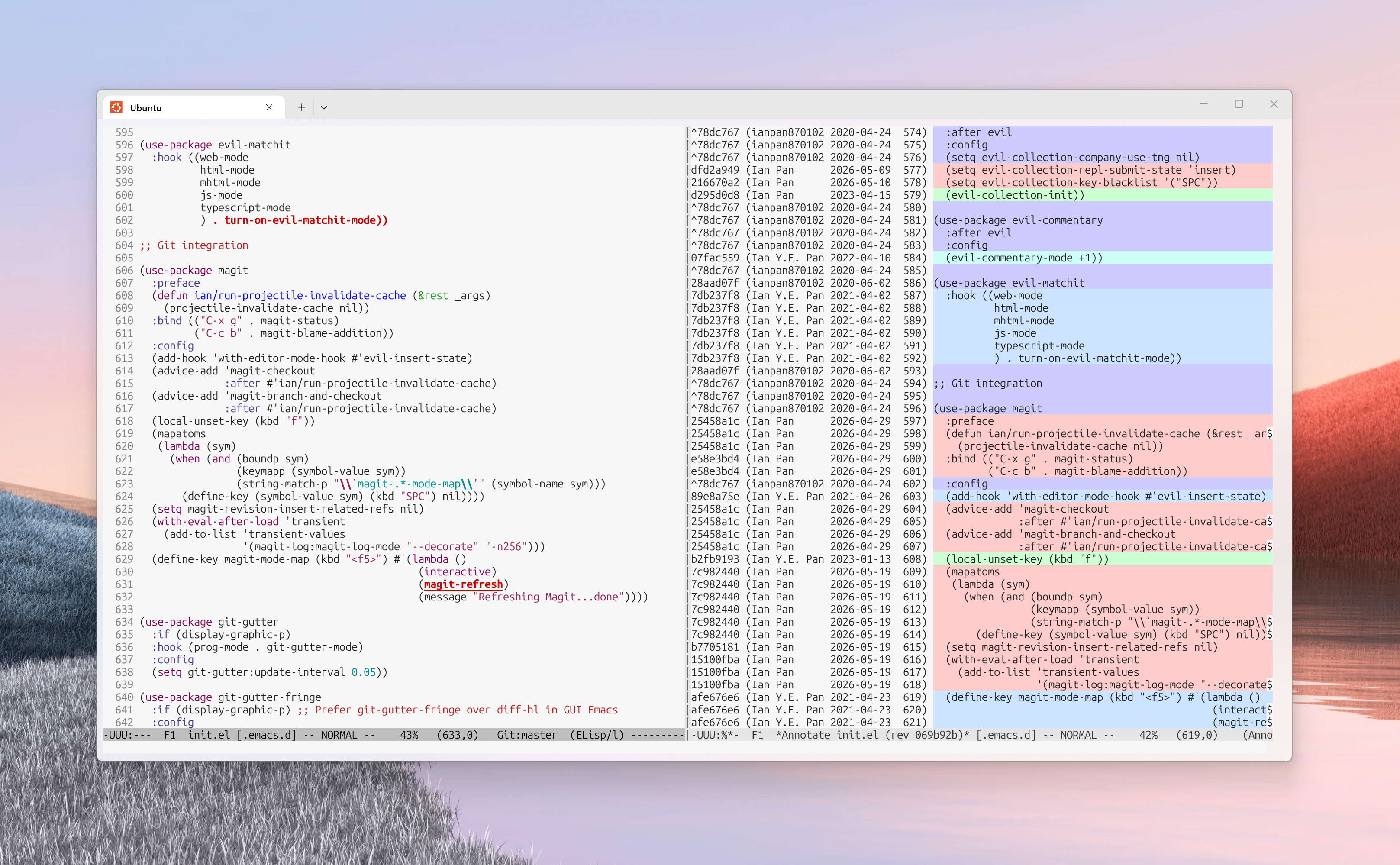 Emacs’ native VC package, showing colored git history in a separate window on the right
VC is a powerful Emacs built-in package that’s often slept on. I started using Magit very early in my Emacs journey almost 10 years ago so I never really got the chance to dive deep into VC. If you’re interested in more content about this native Emacs package, Protesilaos has two YouTube videos on a general introduction to VC and his VC workflow. Below we explore two alternative solutions to show git blame via external packages.
External package #1: git blame via Magit
Magit is a package that needs no introduction. It’s the center piece of most Emacs user’s git workflow and makes non-trivial git operations like interactive rebasing or selecting chunks to stage/unstage in a changed file more intuitive and efficient. For many people, Magit along with Org Mode were the “killer apps” that converted them to becoming full-time Emacsers in the first place.
I’ve been a happy Magit user for years but only recently did I find out about the handy magit-blame-addition command. This command turns your current buffer into an interactive one, annotated with commit messages and timestamps before each chunk of code. It does not extend the left fringe like other git blame UI’s do, but rather inserts the extra git info directly between the lines of code you’re viewing. This allows for fewer annotations because multiple lines of code can belong to the same annotation group if they come from the same commit, and the texts of the annotation get to utilize the full width of your Emacs buffer. Hitting “RET” (enter key) on any line invokes magit-show-commit which opens a new split window containing the full git commit details associated with that line. This is very useful if I want to inspect any other code chunks that were committed along with that piece of code. Hitting “Q” in the Magit blame buffer restores the original code view and removes all blame annotations.
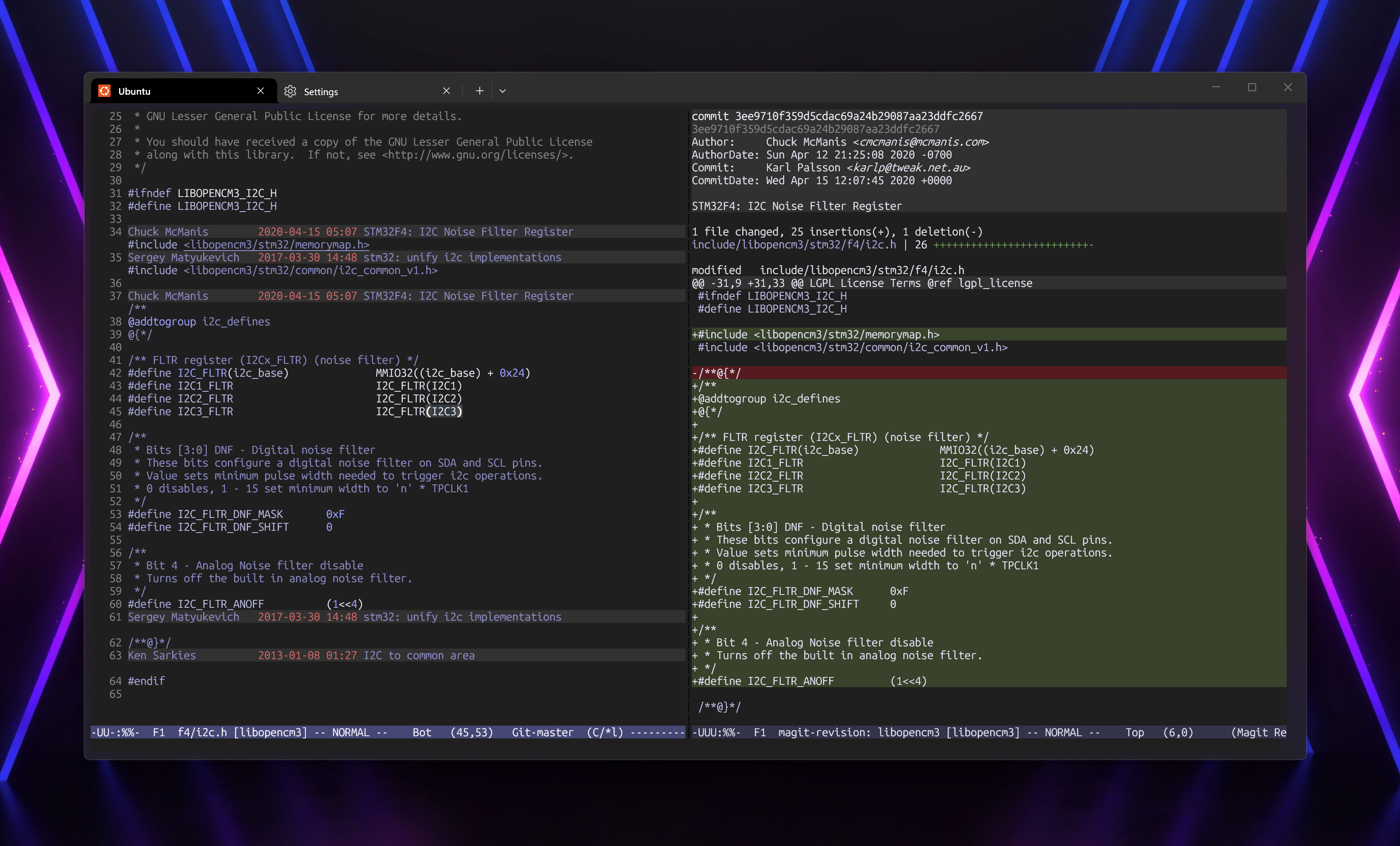 Magit’s inline annotation, hitting ‘enter’ on a line opens the full commit details to the right
u/JDRiverRun on Reddit wrote a package magit-blame-color-by-age that provides recency-aware color coding for the left fringe and magit blame headers. Check it out if you find the default magit blame UI too plain.
External package #2: Blamer.el
So far so good, but there are also times when I just wanna quickly see the commit author or the commit date of a piece of code without having to enter Magit blame buffer view, open the full commit details in a new window, and later restore both.
Introducing blamer.el! Blamer is a neat little package (1,200+ lines of Emacs Lisp code) that provides the command blamer-mode to toggle the “blamer” minor mode. When it’s activated, any line your cursor lands on will automatically have a trailing annotation that shows the author, commit title, and relative time when the code was written. The git blame info updates and follows your cursor whenever you jump to a new line. It’s designed to be an on-the-fly and non-intrusive version control hint provider. Blamer also allows you to configure many options, including date/time format, max text length, and pop-up delay in seconds.
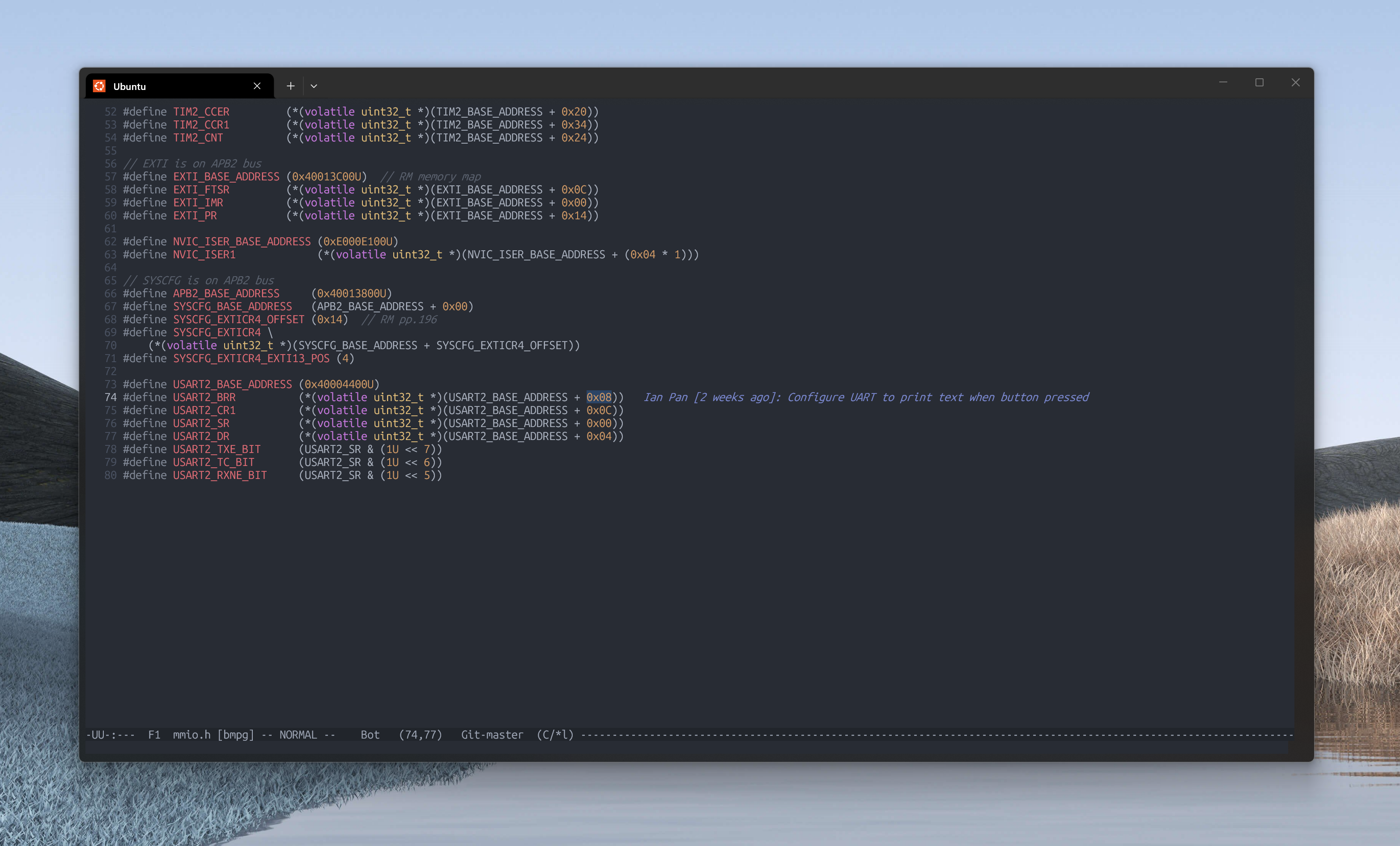 Minimal, on-the-fly git annotation. Powered by blamer.el
The following is my preferred setting. I set the keyboard shortcut of the blamer toggle command to Ctrl-c g.
1
2
3
4
5
6
7
8
9
(use-package blamer
  :bind (("C-c g" . blamer-mode))
  :config
  (setq blamer-idle-time 0.05)
  (setq blamer-author-formatter "%s ")
  (setq blamer-datetime-formatter "[%s]")
  (setq blamer-commit-formatter ": %s")
  (setq blamer-max-commit-message-length 100)
  (setq blamer-min-offset 70))
P.s. If you’re unfamiliar with the usage of use-package, check out my 2021 blog post detailing how to use its syntax to organize your config. As of Emacs 29.1 (released 2023 July), use-package is a built-in feature and you no longer need to install it from external repos.
Concluding words
This post shows three different ways of git blaming in Emacs. You don’t have to choose one over the other. In practice, I use all three. When I wanna quickly check how old a line of code is (or who the author of an ugly piece of code is…), I use C-c g to toggle blamer-mode. When I want maximal context of just the one commit associated with some chunk of code, I use magit-blame-addition and hit RET to take myself to the full details via magit-show-commit. I don’t stay in magit-blame-mode for long, as I find the horizontal inserting of commits between my code distracting – I use it mostly as a stepping stone for magit-show-commit. Finally, if I want an overview of the entire file’s sectional history, I use the built-in color-coded VC annotate.
That’s it for today! Thanks for reading and hope you picked up something new.